October 18, 2026
Build an IFRS 18 income statement in Business Central Financial Reports - mandatory subtotals, completeness check, restated comparatives, no code
- IFRS 18
- Business Central
By Shailesh Apte, Chartered Accountant and Business Central Solution Architect
Tejo Components Ltd reports an operating profit of £2.61m. The board pack says so, the management accounts say so, and Business Central has posted every entry correctly.
Present the same results under IFRS 18 and operating profit becomes £2.35m.
Nothing was posted wrongly. No journal needs reversing. IFRS 18 Presentation and Disclosure in Financial Statements has changed what "operating profit" means. It applies to annual periods beginning on or after 1 January 2027, and it applies retrospectively, so the comparatives must be restated too. That makes it a problem for this year, not next year.
This series builds a complete IFRS 18 reporting pack using Business Central Financial Reports, with no custom code, no extensions and no parallel spreadsheet. Every screenshot comes from a live Business Central environment, and every number in the posts ties back to it. Part 1 starts where the change is most visible: the income statement.
Meet Tejo Components Ltd
Tejo is a UK distributor of industrial components with a sales office in Lisbon. It presents expenses by function (cost of sales, distribution, administration), holds a stake in a joint venture, earns interest on surplus cash, and carries a bank loan and IFRS 16 leases. Each of those features lands in a different part of the new IFRS 18 structure, which is why Tejo runs through all five parts.
The figures are illustrative and internally consistent across the series. FY2027 is Tejo's first IFRS 18 year.
What IFRS 18 changes in the income statement
IAS 1 left the structure of the income statement largely to management. Two companies could both report "operating profit" and mean different things. IFRS 18 removes that freedom in two ways.
1. Every item of income and expense goes into one of five categories:
Operating
Investing
Financing
Income taxes
Discontinued operations
2. Two subtotals become mandatory:
Operating profit or loss
Profit or loss before financing and income taxes
For Tejo, the effect is clear. Its share of the joint venture's profit, interest earned on surplus cash and dividend income used to sit inside "operating profit". Under IFRS 18 they move to the investing category, below the operating profit line. That is the £260k difference.
The detailed classification rules come in Part 2. This post builds the new structure in Business Central.
Tejo's IFRS 18 income statement (£'000)
Line | Category | FY2027 |
|---|---|---|
Revenue | Operating | 12,000 |
Cost of sales | Operating | (7,200) |
Distribution costs | Operating | (1,100) |
Administrative expenses | Operating | (1,500) |
Other operating income | Operating | 150 |
Operating profit | 2,350 | |
Share of profit of joint venture | Investing | 180 |
Interest income | Investing | 60 |
Dividend income | Investing | 20 |
Profit before financing and income taxes | 2,610 | |
Interest on bank loan | Financing | (220) |
Interest on lease liabilities | Financing | (90) |
Unwinding of discount on provisions | Financing | (30) |
Profit before tax | 2,270 | |
Income tax | Income taxes | (570) |
Profit for the year | 1,700 |
Step 1: Set up governance before you build
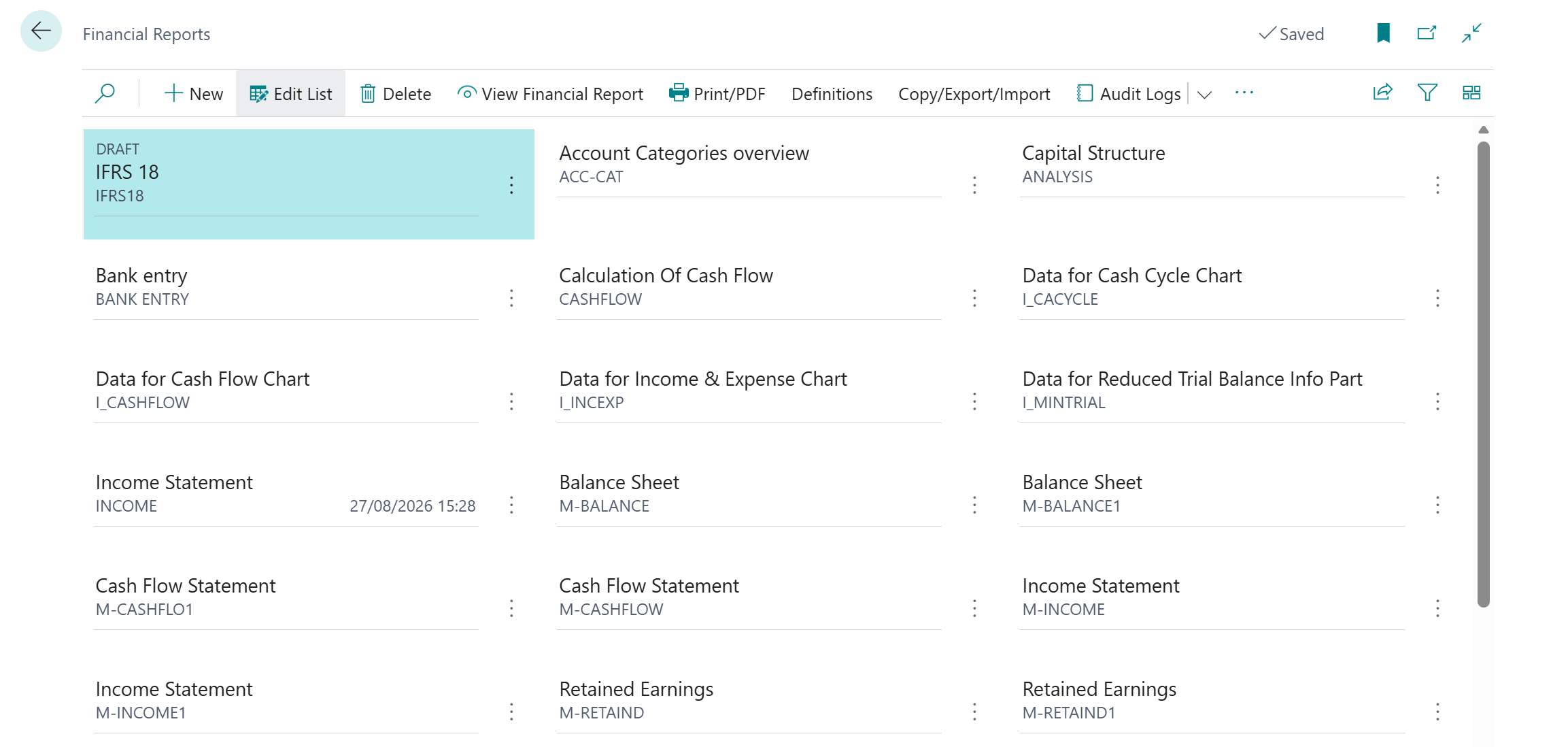
Open Financial Reports. Since the 2026 release wave 1, the page has a tile view showing each report’s status, category, description and last run date. Use it from day one.
Create a report category called IFRS 18. Every report in this series goes there, so the whole pack sits together on the tile view.
Set the new report's status to Draft. It moves to Released in Part 5, once the full pack has been reviewed.
Set the global report defaults on the General Ledger Setup page, new in the 2026 release wave 1:
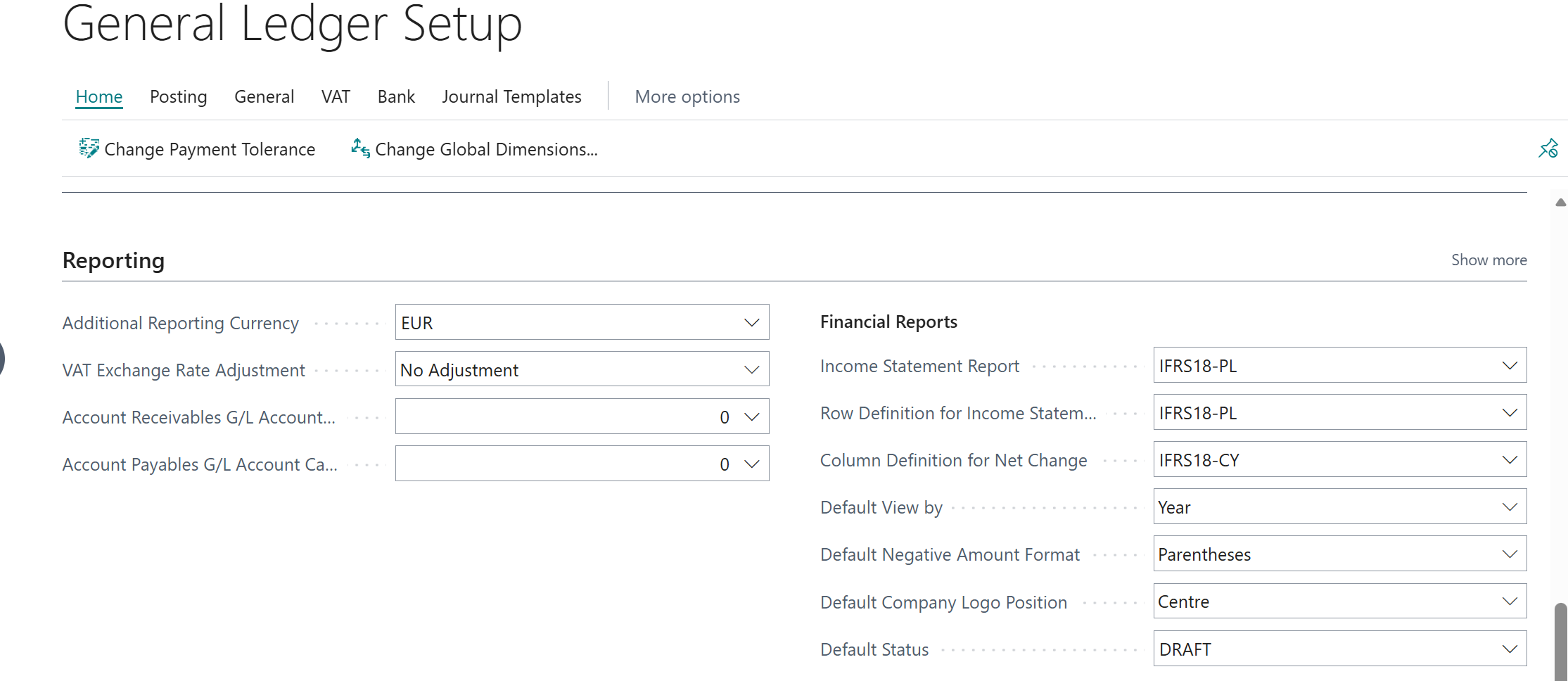 so every new report starts as a draft. Every report in the pack then looks the same without per-report setup, and any single report can still override them.
Two minutes of setup, and anyone opening Financial Reports can see what is still being built and what has been approved.
Step 2: Create the IFRS18-PL row definition
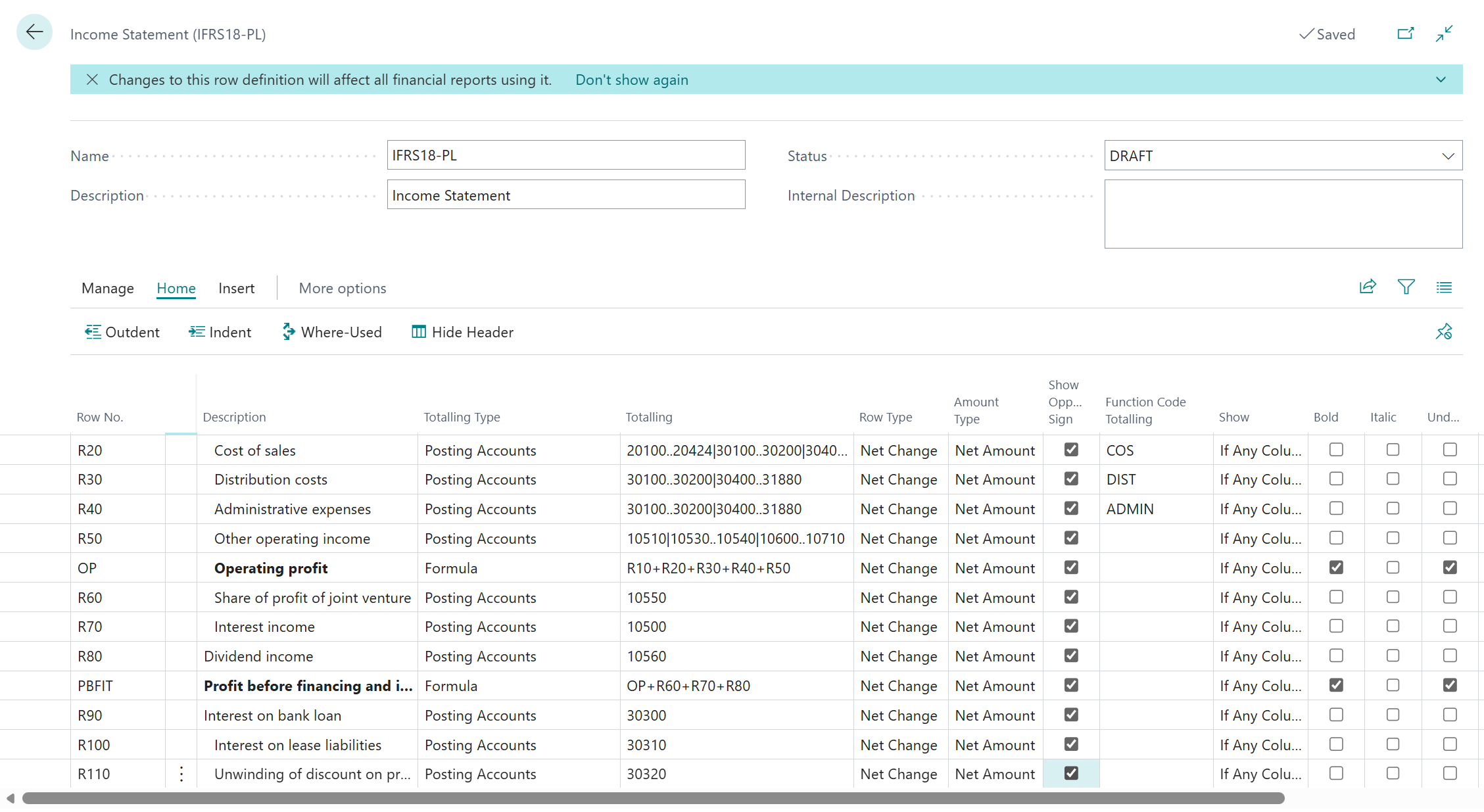
Create a row definition called IFRS18-PL. Each row needs three decisions:
Totaling Type: where the number comes from (Posting Accounts or Formula)
Totaling: which accounts, or which rows
Formatting: how it displays
Tejo's chart of accounts is organised by nature. Salaries, depreciation and rent each have one account, whichever function the cost belongs to.
The function itself sits in a FUNCTION dimension (COS, DIST, ADMIN). That is why the three function lines below share the same account range and differ only in Dimension 1 Totaling.
Part 3 explains this design and its alternative in full.
Row No. | Description | Totaling Type | Totaling | Dimension 1 Totaling |
|---|---|---|---|---|
R10 | Revenue | Posting Accounts | 10100..10103|10200..10450|10520|31900 | |
R20 | Cost of sales | Posting Accounts | 20100..20424|30100..30200|30400..31880 | COS |
R30 | Distribution costs | Posting Accounts | 30100..30200|30400..31880 | DIST |
R40 | Administrative expenses | Posting Accounts | 30100..30200|30400..31880 | ADMIN |
R50 | Other operating income | Posting Accounts | 10510|10530..10540|10600..10710 | |
OP | Operating profit | Formula | R10+R20+R30+R40+R50 | |
R60 | Share of profit of joint venture | Posting Accounts | 10550 | |
R70 | Interest income | Posting Accounts | 10500 | |
R80 | Dividend income | Posting Accounts | 10560 | |
PBFIT | Profit before financing and income taxes | Formula | OP+R60+R70+R80 | |
R90 | Interest on bank loan | Posting Accounts | 30300 | |
R100 | Interest on lease liabilities | Posting Accounts | 30310 | |
R110 | Unwinding of discount on provisions | Posting Accounts | 30320 | |
PBT | Profit before tax | Formula | PBFIT+R90+R100+R110 | |
R120 | Income tax | Posting Accounts | 31950 | |
PFY | Profit for the year | Formula | PBT+R120 | |
CHK | All P&L accounts (hidden) | Posting Accounts | 10000..31995 | |
CHK2 | Completeness check | Formula | CHK-PFY |
Note how the financing accounts 30300 to 30320 sit inside Tejo's expense range but are left out of the three function lines. That is IFRS 18 at work in the row definition: interest moves below operating profit.
Step 3: Get the signs right once
This is where most income statements in Business Central go wrong.
The ledger stores income as credits (negative) and expenses as debits (positive). If you flip signs row by row, the subtotals mix presentation signs with ledger signs, and the totals break.
The fix is simple:
Write every formula on raw ledger values. Operating profit is just R10 to R50 added together.
Set Show Opposite Sign to Yes on every row, including the formula rows, and leave it off on the column.
Business Central calculates on ledger values and flips only at display. Revenue shows as 12,000, costs show in brackets, and operating profit shows as 2,350.
Then format OP, PBFIT and PBT as Bold with Underline, and Profit for the year with Double Underline.
Step 4: Build a completeness check into the report
The last two rows are the ones auditors notice.
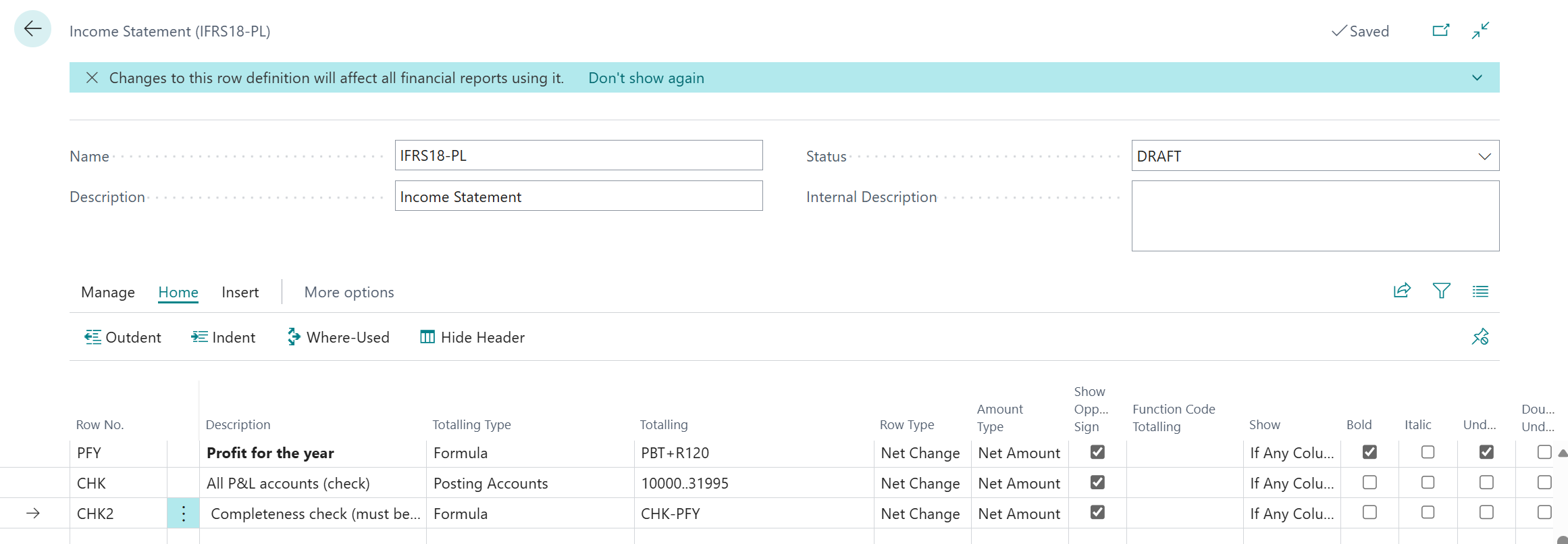
CHK totals every income statement account, 10000..31995, with Show set to No.
CHK2 subtracts profit for the year from it.
If any posting lands in an account that no line picks up, or a cost is posted without a FUNCTION value, CHK2 stops being zero. In Tejo's build it caught a £100 posting with the wrong function on the first run. The row definition tests itself every time it runs.
Step 5: Build the column definition
Create a column definition called IFRS18-CY-PY:
Column No. | Header | Column Type | Formula / comparison | Rounding Factor |
|---|---|---|---|---|
C1 | FY2027 | Net Change | None | 1000 |
C2 | FY2026 (restated) | Net Change | Comparison Date Formula: -1Y | 1000 |
C3 | Variance | Formula | C1-C2 | 1000 |
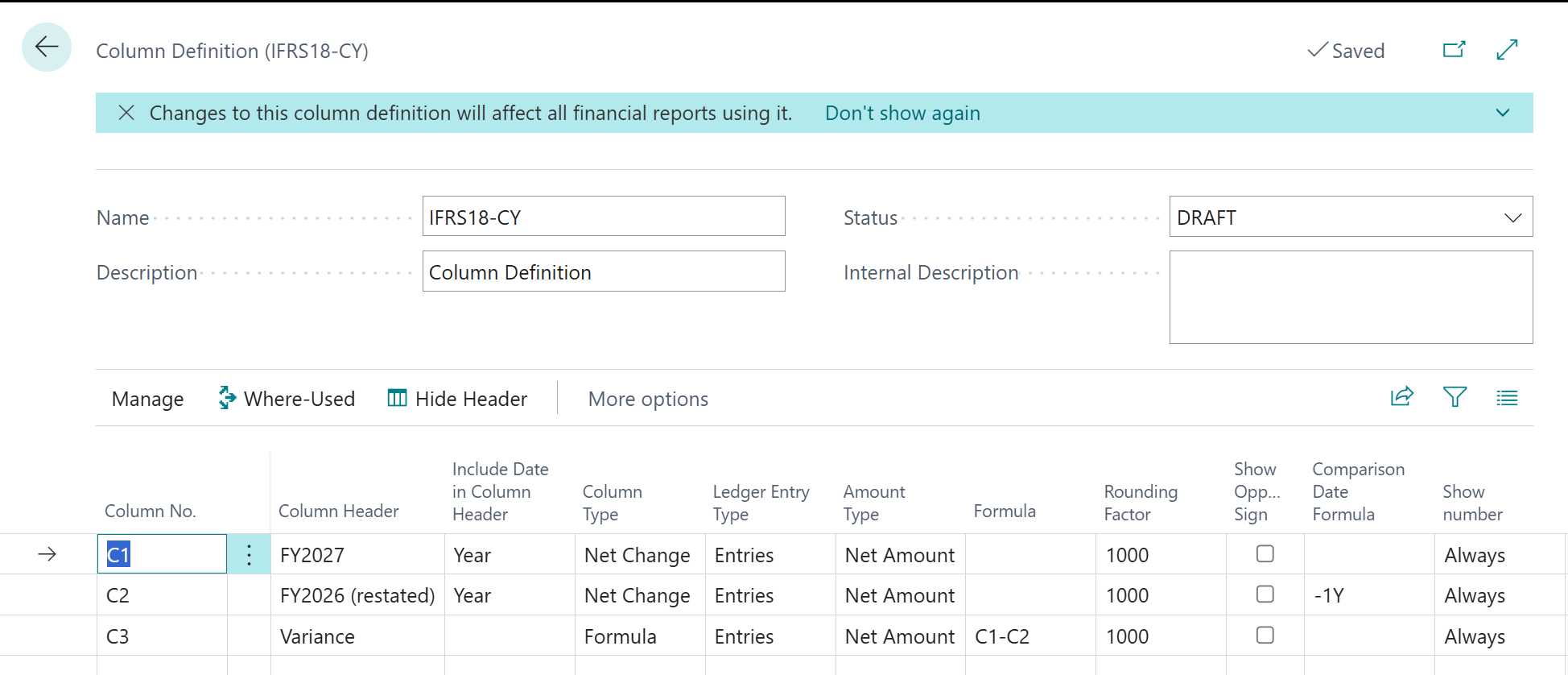 The Comparison Date Formula shifts the date filter back one year, so one report run produces both years. IFRS 18 is retrospective, so the restated comparative comes from the same definition as the current year. Rounding Factor 1000 presents the statement in £'000 with no export to Excel.
Step 6: Run the report and prove the tie to the ledger
Link the row and column definitions on the Financial Report card. Set the date filter to the financial year and run it.
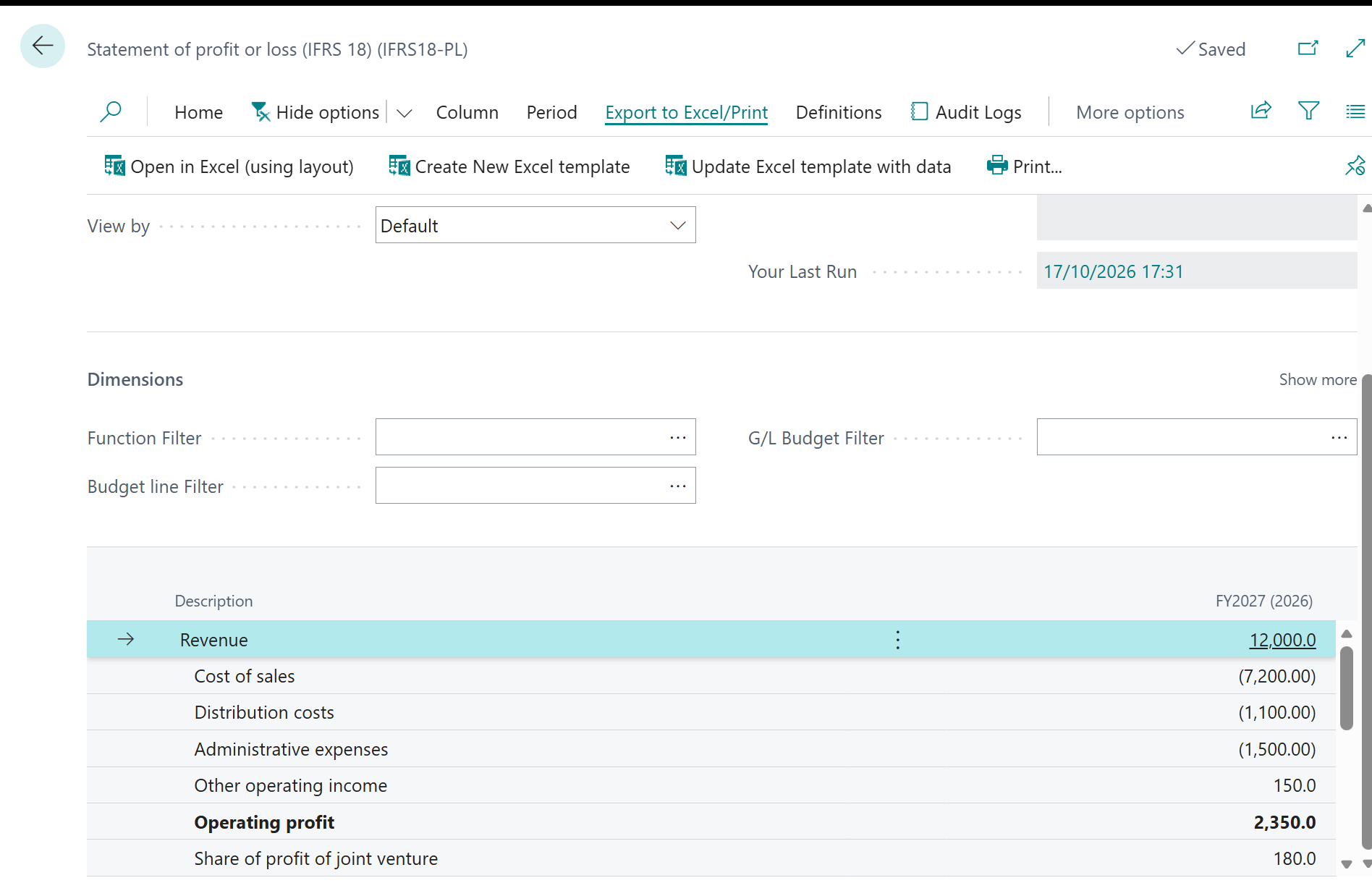
Now click Revenue. Business Central drills down to the G/L entries, and from there to the documents behind them. Formula rows show which rows build each subtotal.
This is the reason to build IFRS 18 inside Business Central rather than in a spreadsheet. Every number in the new statement traces back to a posted document. When the auditor asks where operating profit came from, the answer is two clicks away.
What we have, and what is missing
Tejo now has an IFRS 18-structured income statement in Business Central, with:
Required subtotals
A completeness check built into the report
A drill-down trail to source documents
Business Central features used in this post: Financial Reports tile view, report categories and statuses, global report defaults (all 2026 release wave 1); row and column definitions; formula rows; Dimension Totaling; Show Opposite Sign; Comparison Date Formula; Rounding Factor; drill-down.
The weak point is the account ranges typed into the Totaling column. When someone creates a new account, a person has to remember to add it to the right range.
Part 2 fixes that. It uses Business Central G/L Account Categories to put the IFRS 18 classification on the accounts themselves. It also uses the new 2026 release wave 2 features that show which accounts were never classified at all.