October 25, 2026
Business Central G/L Account Categories: Mapping the Chart of Accounts to Operating, Investing and Financing
- IFRS 18
- Business Central
By Shailesh Apte, Chartered Accountant and Business Central Solution Architect
Business Central G/L Account Categories have been in the product for years, mostly to drive the standard balance sheet and income statement. In this post they become the place where every account carries its IFRS 18 category, so Business Central Financial Reports can build the new statement without a single account range.
Under IFRS 18 every income and expense account must sit in exactly one category: operating, investing, financing or income taxes. The question auditors will ask is not "is the report correct?" but "how do you know no account was missed?" Business Central can now answer that on screen.
In Part 1 we built Tejo Components Ltd's income statement in Business Central Financial Reports, with the two new IFRS 18 subtotals and a CHK2 row that compares the statement with every P&L account. It works, but it relies on account ranges typed into the Totaling column. Part 2 moves the classification onto the accounts with G/L Account Categories, switches the row definition to Account Category totaling, and proves completeness with the Uncategorized G/L Accounts page. It closes with the account trace tools arriving in Business Central version 29.
Before you open Business Central: the accounts that need a decision
Most accounts in Tejo's chart need no thought: revenue, cost of sales and overheads are operating, and income tax is income taxes. A handful need a decision before you touch Business Central, because IFRS 18 moves them out of operating profit, or keeps them in when people expect otherwise. Agree these with your auditor first. The table below is exactly what goes into Business Central.
Lessors, lenders and asset financiers: if providing finance is your main business, some of this interest belongs in operating instead. My IFRS 9 lessor series covers that Business Central set-up.
The eight accounts that need a decision
Account | Description | IFRS 18 category | Why |
|---|---|---|---|
10550 | Share of profit of joint venture | Investing | Equity-accounted investee |
10500 | Interest income | Investing | Return on cash and cash equivalents |
10560 | Dividend income | Investing | Return on an investment |
30300 | Interest on bank loan | Financing | Liability that only raises finance |
30310 | Interest on lease liabilities | Financing | Interest on other liabilities |
30320 | Unwinding of discount on provisions | Financing | Discounting effect on other liabilities |
10540 | Realised gain/loss on exchange | Operating | Follows the underlying trade payables |
10710 | Sale of fixed assets | Operating | Asset used in operations |
Look at the account numbers. The financing accounts sit in Tejo's 30000 expense range and the investing accounts in its 10000 income range. A chart of accounts built before IFRS 18 rarely lines up with the new categories, which is why the classification belongs on the account in Business Central, not in an account number or a report range.
Step 1: G/L Account Categories – build the IFRS 18 subcategory tree
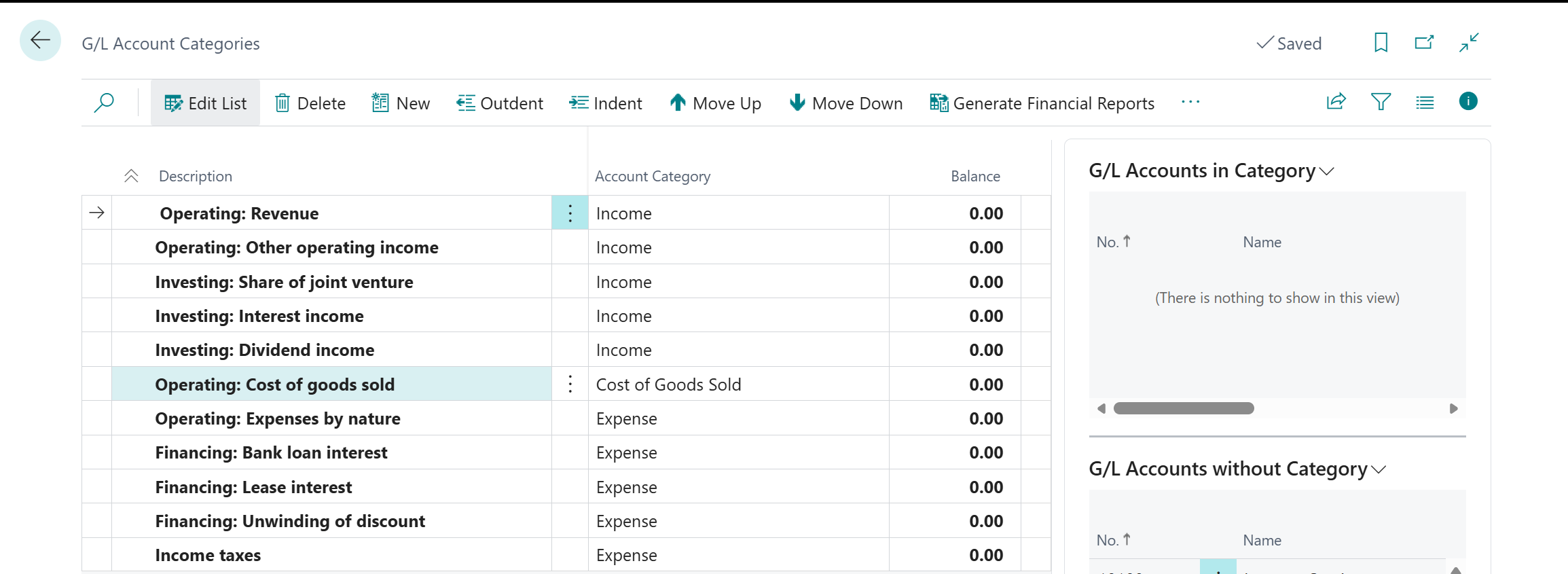
Search for G/L Account Categories. Business Central already holds a category tree (Assets, Liabilities, Equity, Income, Cost of Goods Sold and Expense) that it uses to generate the standard financial reports. Each top-level category can carry subcategories, which you add with New, Indent and Move Up / Move Down on the same page.
Under the income statement categories, add subcategories that carry the IFRS 18 category in their names:
Top-level category | IFRS 18 subcategory |
|---|---|
Income | Operating: Revenue |
Income | Operating: Other operating income |
Income | Investing: Share of joint venture |
Income | Investing: Interest income |
Income | Investing: Dividend income |
Cost of Goods Sold | Operating: Cost of goods sold |
Expense | Operating: Expenses by nature |
Expense | Financing: Bank loan interest |
Expense | Financing: Lease interest |
Expense | Financing: Unwinding of discount |
Expense | Income taxes |
Every subcategory name starts with its IFRS 18 category, so anyone reading the category tree sees the structure of the new statement without opening a report.
Why one Operating: Expenses by nature subcategory instead of one per function?
Because Tejo's chart of accounts is by nature: one salaries account serves the warehouse, the sales team and finance. In Business Central the account category tells the report which IFRS 18 category a cost belongs to, and the FUNCTION dimension tells it which line. Part 3 builds on that split.
Step 2: Chart of Accounts and Edit in Excel (Assign every account)
Open the Chart of Accounts, filter on the income statement accounts and choose Edit in Excel. Fill the Account Subcategory column, then Publish back to Business Central. Business Central only accepts a subcategory that sits under the account's own Account Category, so it also catches an income account placed in an expense subcategory. Start with the eight accounts in the table, then sweep the rest.
You may notice the Additional Report Definition field on G/L Account Categories, with values such as Operating Activities, Investing Activities and Financing Activities. Business Central uses it for the cash flow statement, and Part 5 comes back to it. Keep the two classifications separate.
One practical warning. If you ever use the action that regenerates Business Central's standard financial reports from the categories, keep your IFRS 18 row and column definitions under their own names (IFRS18-PL, IFRS18-PLN, IFRS18-CY), so nothing standard overwrites them.
Step 3: Row definitions : Switch to Account Category totaling
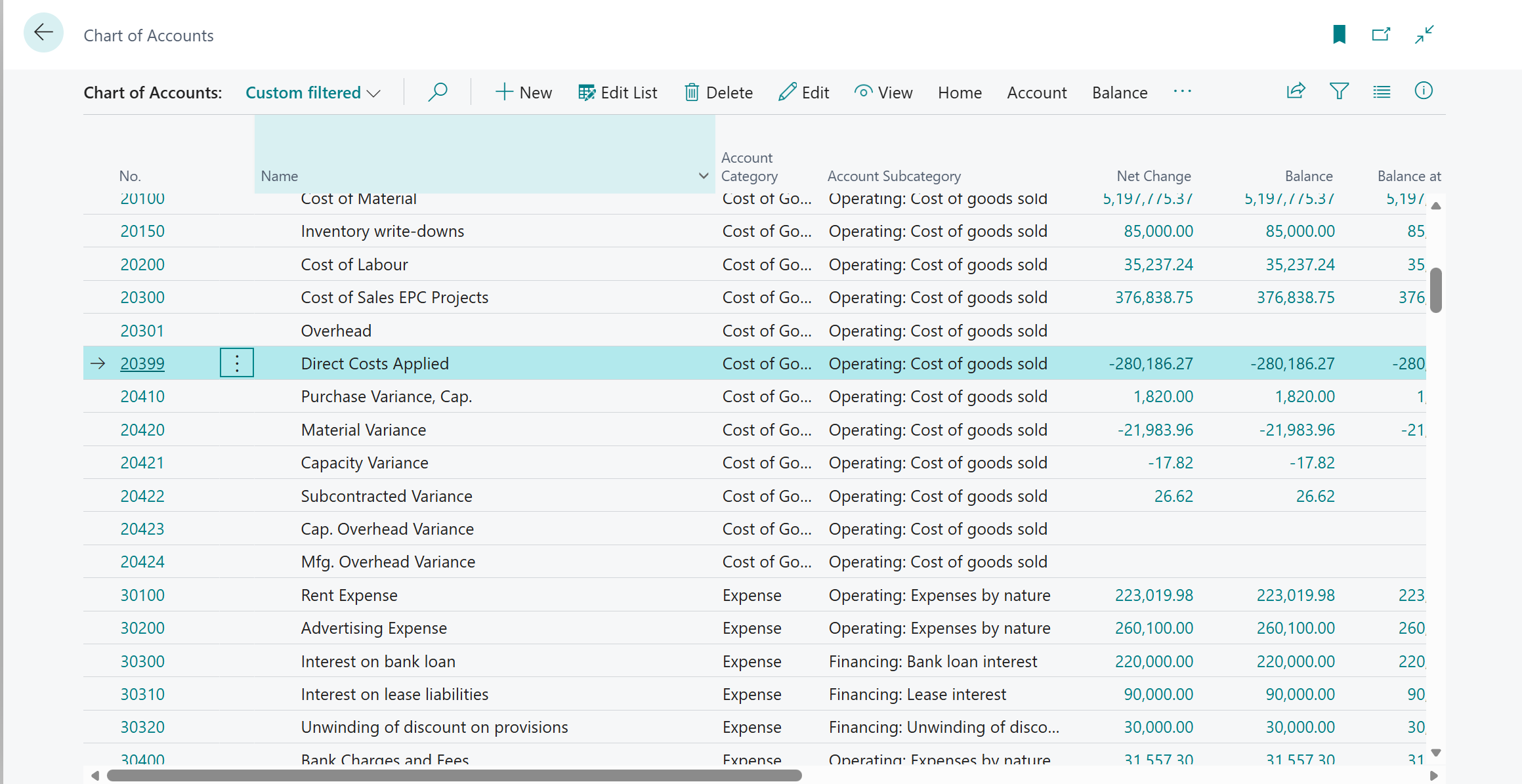
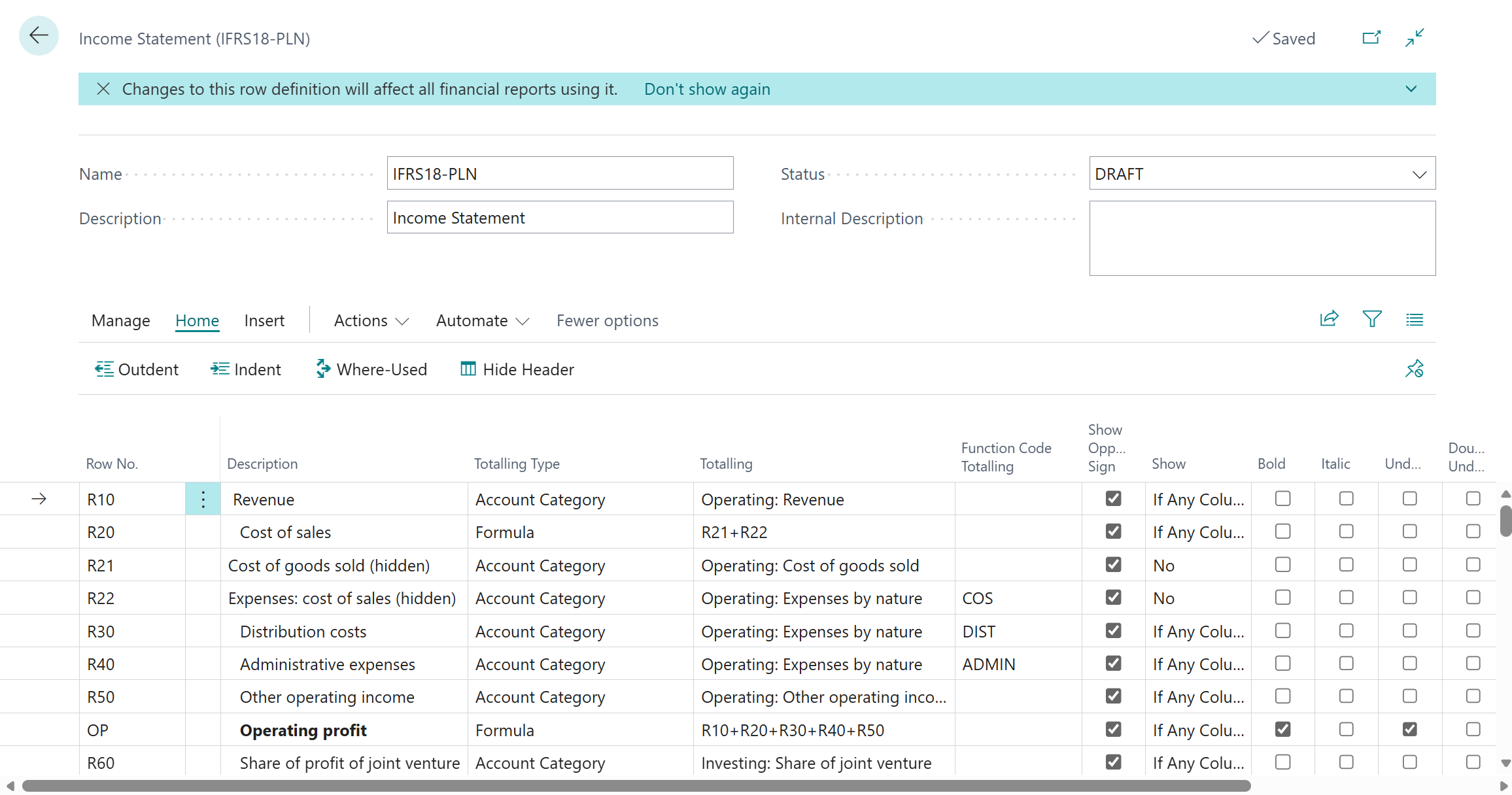
Copy IFRS18-PL from Part 1 to a new row definition, IFRS18-PLN, so the Part 1 version stays intact. For each detail row, change the Totaling Type from Posting Accounts to Account Category and pick the matching subcategory. The function lines keep their Function Code (Dimension 1) filter.
Row No. | Description | Totaling Type | Totaling | Function Code Totaling (Dimension 1) |
|---|---|---|---|---|
R10 | Revenue | Account Category | Operating: Revenue | |
R20 | Cost of sales | Formula | R21+R22 | |
R21 | Cost of goods sold (hidden) | Account Category | Operating: Cost of goods sold | |
R22 | Expenses: cost of sales (hidden) | Account Category | Operating: Expenses by nature | COS |
R30 | Distribution costs | Account Category | Operating: Expenses by nature | DIST |
R40 | Administrative expenses | Account Category | Operating: Expenses by nature | ADMIN |
R50 | Other operating income | Account Category | Operating: Other operating income | |
R60 | Share of profit of joint venture | Account Category | Investing: Share of joint venture | |
R70 | Interest income | Account Category | Investing: Interest income | |
R80 | Dividend income | Account Category | Investing: Dividend income | |
R90 | Interest on bank loan | Account Category | Financing: Bank loan interest | |
R100 | Interest on lease liabilities | Account Category | Financing: Lease interest | |
R110 | Unwinding of discount on provisions | Account Category | Financing: Unwinding of discount | |
R120 | Income tax | Account Category | Income taxes |
Rows R21 and R22 are helper rows: set Show to No so they calculate but do not print. The formula rows (OP, PBFIT, PBT, PFY) and the completeness check (CHK, CHK2) do not change.
Now run the financial report on IFRS18-PLN and choose Recalculate. The numbers must match Part 1 exactly: revenue 12,000, operating profit 2,350, profit for the year 1,700. If they do not, the difference is an account that sat inside a Part 1 range but has no subcategory, which is exactly what Step 4 finds.
Before you change a shared row definition, choose Where-Used on the row definition page. It lists every financial report that uses IFRS18-PLN, and Business Central shows a banner reminding you that changes affect all of them.
From now on, a new account appears on the right line the moment someone assigns its subcategory. Classification has moved from the report to the ledger.
Step 4: Uncategorized G/L Accounts: Prove completeness
Search for Uncategorized G/L Accounts. The page lists every G/L account without a category. On an IFRS 18 build it is your exception report: if it is not empty, the statement is incomplete.
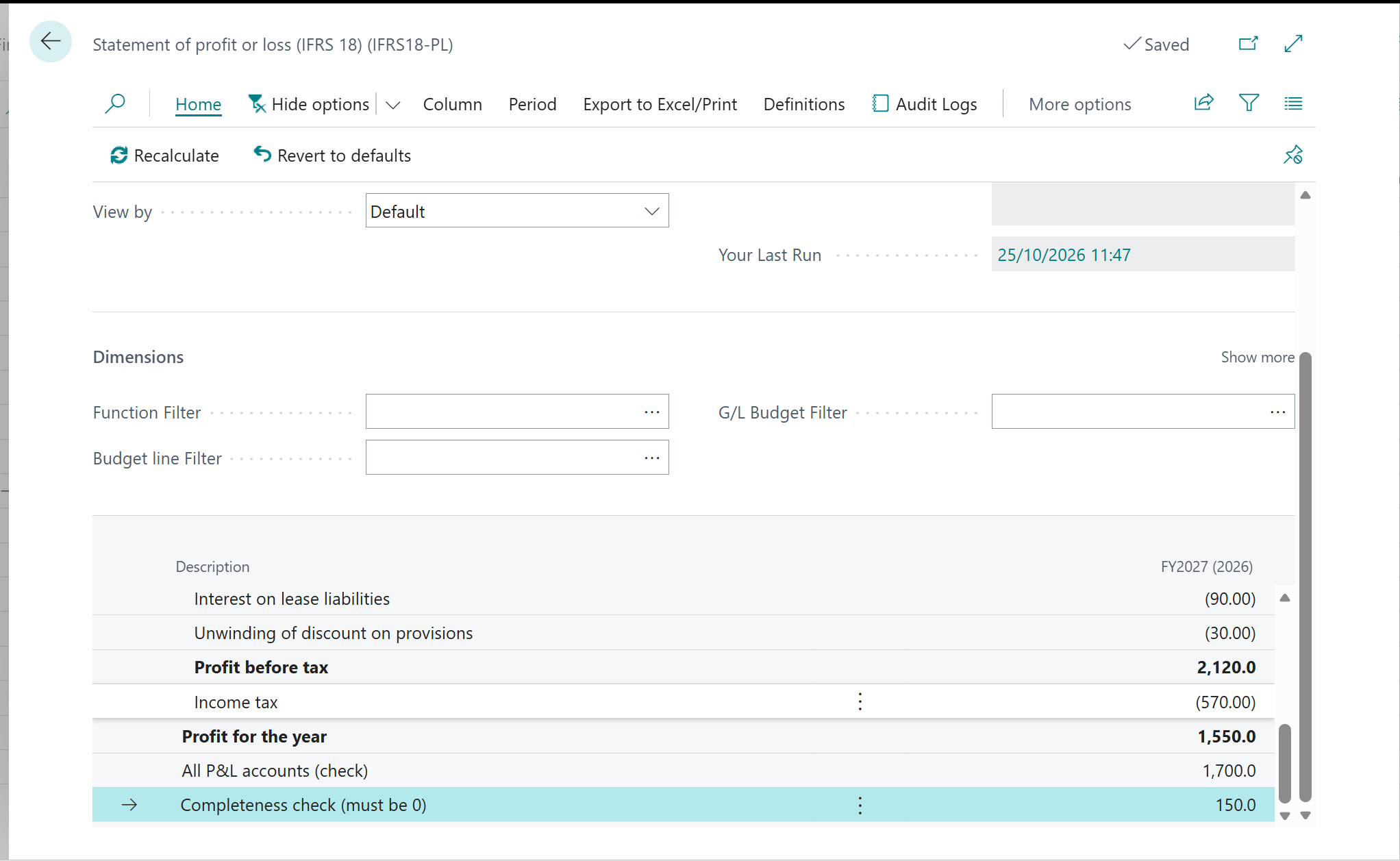
On Tejo's first run it was not empty. It listed seven accounts nobody had ever mapped: commission income (10510), the foreign exchange accounts (10530, 10540) and the travel accounts (31850 to 31880). These were accounts created years ago, sitting outside every category.
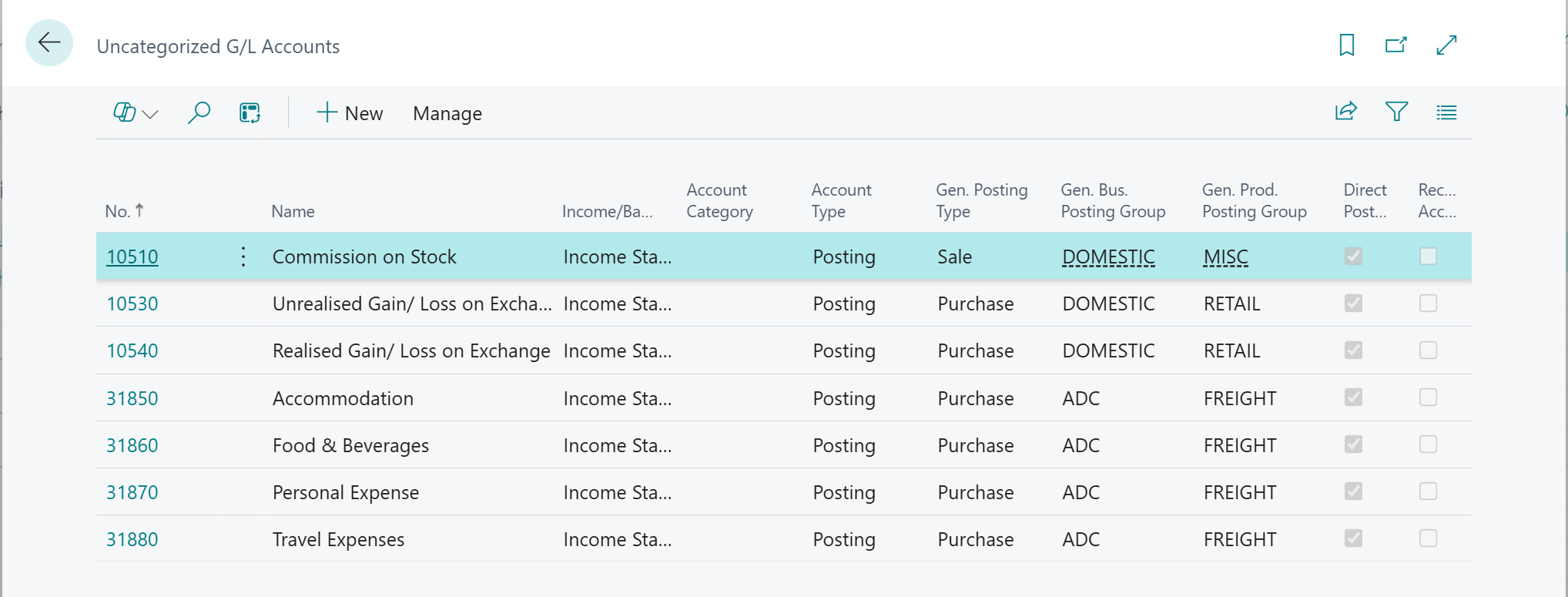
Business Central does not raise an error for an uncategorised account. With Account Category totaling, the account simply drops off the statement. Commission (£190k) and the £40k FX loss were both on the list, so IFRS18-PLN showed other operating income of 0 instead of 150, and operating profit of £2.20m instead of £2.35m: a 6% understatement of the headline IFRS 18 subtotal. The CHK2 row from Part 1 caught it, showing 150.
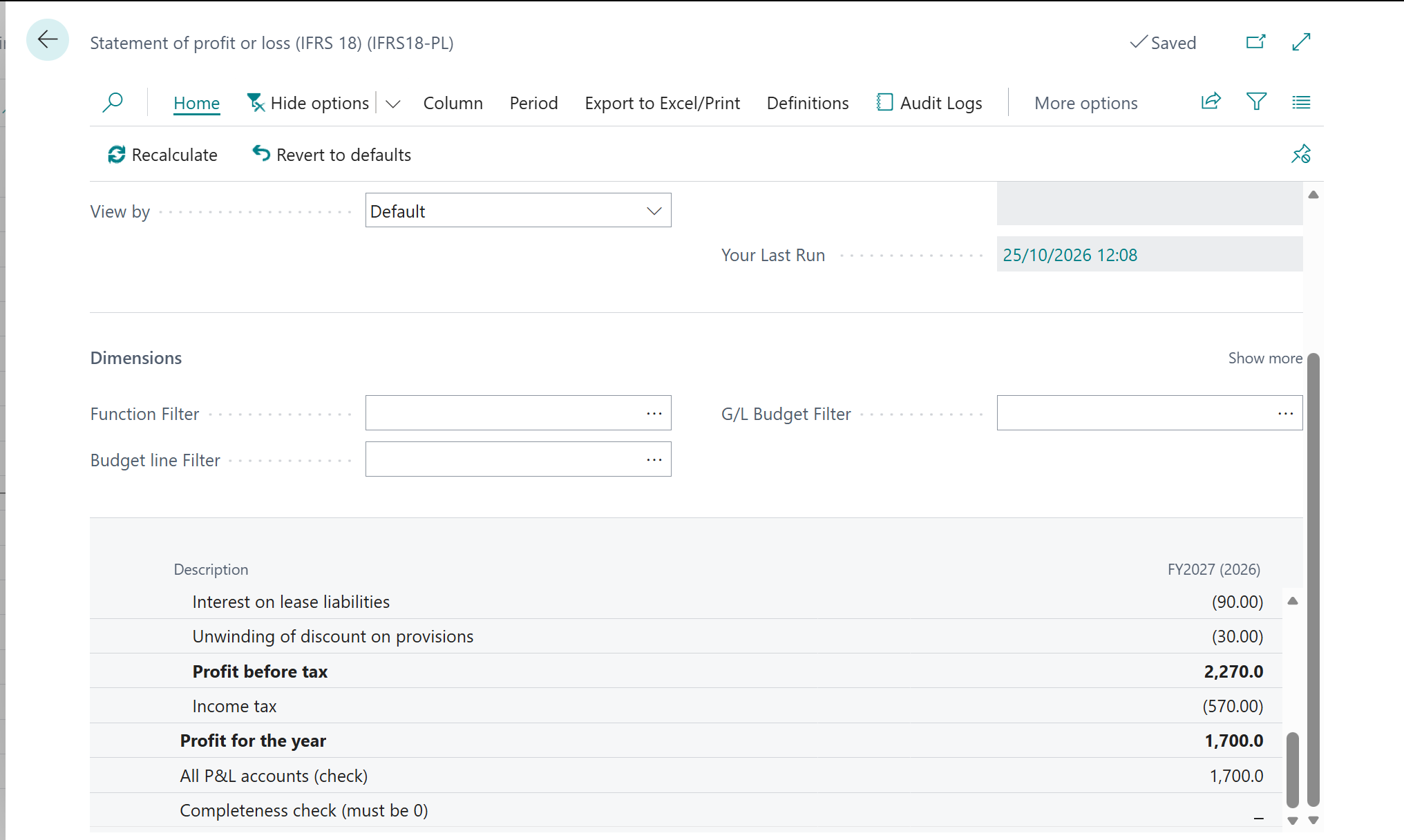
I assigned the seven subcategories with Edit in Excel and chose Recalculate on the report. The list was empty, operating profit was back to 2,350, and CHK2 was back to zero.
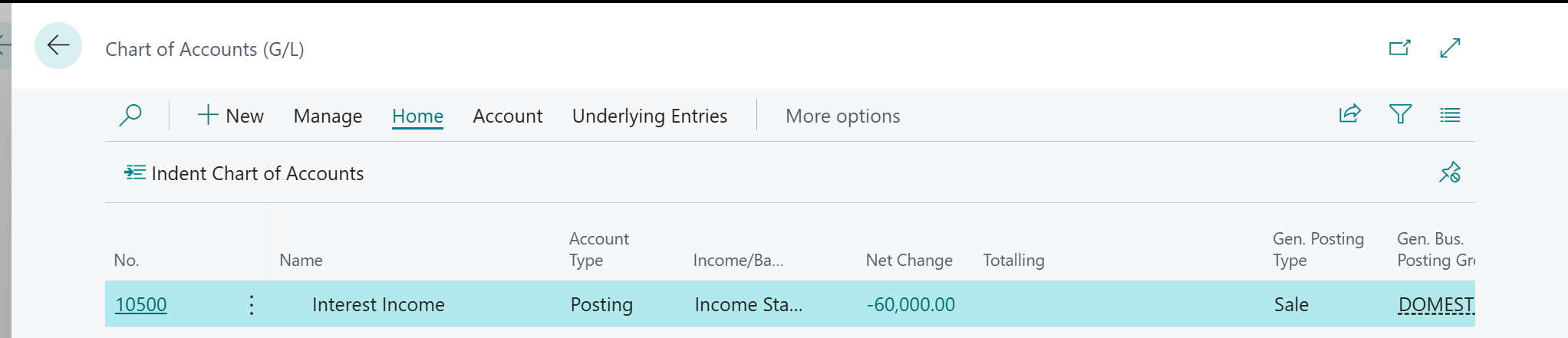
Then follow 10500 Interest income through Business Central. On G/L Account Categories, select Investing: Interest income: the G/L Accounts in Category FactBox shows 10500 as its only account. On the IFRS18-PLN financial report, drill into row R70: every G/L entry behind it posts to 10500, and the row sits below operating profit. Two screens, and the auditor's question "show me that interest income is not in operating profit" is answered.
What Business Central version 29 adds
Business Central version 29 (2026 release wave 2) turns these checks into dedicated financial reporting tools:
Trace account usage. Select an account and see every financial report and row that uses it. For 10500 that is R70 of IFRS18-PLN, below operating profit: the audit question above, answered from the account side in one screen.
Preview definitions before publishing. See the results of a changed row definition, such as this switch from Posting Accounts to Account Category, before anyone else runs it.
Always-on change logging. Every change to a financial report definition is recorded, so the IFRS 18 mapping you have just built carries its own audit trail.
Microsoft's roadmap has the detail: Trace G/L account usage in finance reports and Financial report changes are now always logged. I will add screenshots of these as soon as the Tejo environment moves to version 29.
What Business Central now does for you
G/L Account Categories carry the IFRS 18 category on every income and expense account.
IFRS18-PLN builds from Account Category totaling, so a new account lands on the right line as soon as it has a subcategory.
The Uncategorized G/L Accounts page, the G/L Accounts in Category FactBox and the CHK2 row prove nothing has been missed. Version 29's account trace adds the same proof from the account side.
Business Central features used in this post: G/L Account Categories and subcategories; Account Category totaling; Edit in Excel; Uncategorized G/L Accounts; Where-Used; drill-down. New in version 29: trace account usage, preview before publishing and always-on change logging.
Part 3 moves to Business Central dimensions in Financial Reports. Tejo presents expenses by function, so IFRS 18 asks how much depreciation, staff cost and inventory write-down sits inside each line. A column definition with FUNCTION across the top answers it, and dimension perspectives run it for every office in one go.