September 21, 2026
Subscription Billing, Deferral Schedules & Contract Liabilities in Business Central - PART 3 OF 5
- IFRS 15
- Business Central
By Shailesh Apte, Chartered Accountant and Business Central Solution Architect
"You invoice a customer £36,000 on 1 March for a 12-month SaaS subscription. How much revenue do you recognise in March? Most people say £3,000. The right answer is: it depends on whether the subscription starts on 1 March, and how many days are in the period." Charge upfront, spread the revenue, simple in theory. The detail is where it bites: pro-rating mid-month starts, mid-term upgrades, and automating the deferral of hundreds of live subscriptions at once. This post builds that machinery in Business Central. |
Recap so far: one contract, many documents in Business Central
Before we get to that number, one point from Part 1 is worth restating, because everything in this series builds on it. Part 1’s central claim was never really about revenue timing. It was architectural. A single contract splits across three documents: a Sales Order for the goods or services, a Project for the implementation, and Subscription Billing for the recurring services. Business Central posts where the work actually happens, on each document, then uses a single tag running through every posting (the CONTRACT dimension) to reunite them into one IFRS 15 contract. |
Sales Order | Project (Jobs) | Subscription Billing ◀ this post |
Goods or service Point in time The perpetual licence and the hardware. Billed at quoted price, recognised at a point in time when control transfers. | Implementation Over time The professional-services element. Planning lines and WIP, recognised over time on percentage-of-completion. | Recurring services Over time Support and any ongoing service. Billed and deferred, released pro rata across the term. |
That is the idea the whole series stands on: Business Central lets one contract span many documents and still report as one.
With that foundation in place, Part 3 lives entirely inside that third column Subscription Billing. The cash is in on day one; the revenue isn't earned yet. This post is about the gap between the two, how Business Central defers the invoice and releases it, month by month, across the whole term.
THE RUNNING CASE Company: TechCo Ltd (from the D365PPUG stage) Customer: RetailCo UK Ltd Contract value: £150,000 Framework: IFRS 15 and UK FRS 102 Section 23
→ PO3 is the deferral example. Cloud Axis, below, scales the identical mechanics to hundreds of simultaneous subscriptions. |
The rule: billing drives cash, control transfer drives revenue
A subscription invoice never lands straight in the P&L.
Subscription Billing raises the invoice to a contract-liability account (Dr Accounts Receivable / Cr Contract Liability); the deferral release then moves it into revenue, month by month. Invoice and recognised revenue almost never coincide — the gap between them is the contract liability sitting on the balance sheet.
DEEPER EXAMPLE Company: CloudAxis SaaS Ltd (SaaS: Cloud project-management software) Customer: Marrick Consulting (Professional Services Firm) Product: Professional Subscription billed annually in advance, recognised monthly Scale:400+ active subscription lines at any month end, in various stages of deferral Price (per year for Subscription): £9,600 per User No of Users: 10 Total Contract Value: £96,000 |
Platform access (12 months)
Standalone Selling Price= £ 96,000 for 10 Users
Recognised Over time: Under IFRS 15.B58 that makes it a right to access Cloud Axis's evolving IP, satisfied over time (IFRS 15.35), so revenue is recognised across the subscription period.
Configuration: Subscription Billing in Business Central
The BC setup walkthrough that follows puts it into practice, using the Professional tier throughout. One note before the screenshots: in this tenant the Professional platform is set up as the subscription item Growth Platform (Subscription Item) that is the line you will see in every screen below.
BC gives you two ways to defer.
You can attach a manual G/L deferral template to an invoice line by hand. This is fine for a one-off.
But CloudAxis runs hundreds of live subscriptions, so the revenue engine belongs to the subscription module.
Step 1 Set it up as a Customer Subscription Contract
In Subscription Billing you build a Customer Subscription Contract: when you post its invoices, contract deferrals are created automatically, and you release them to the general ledger to recognise revenue period by period.
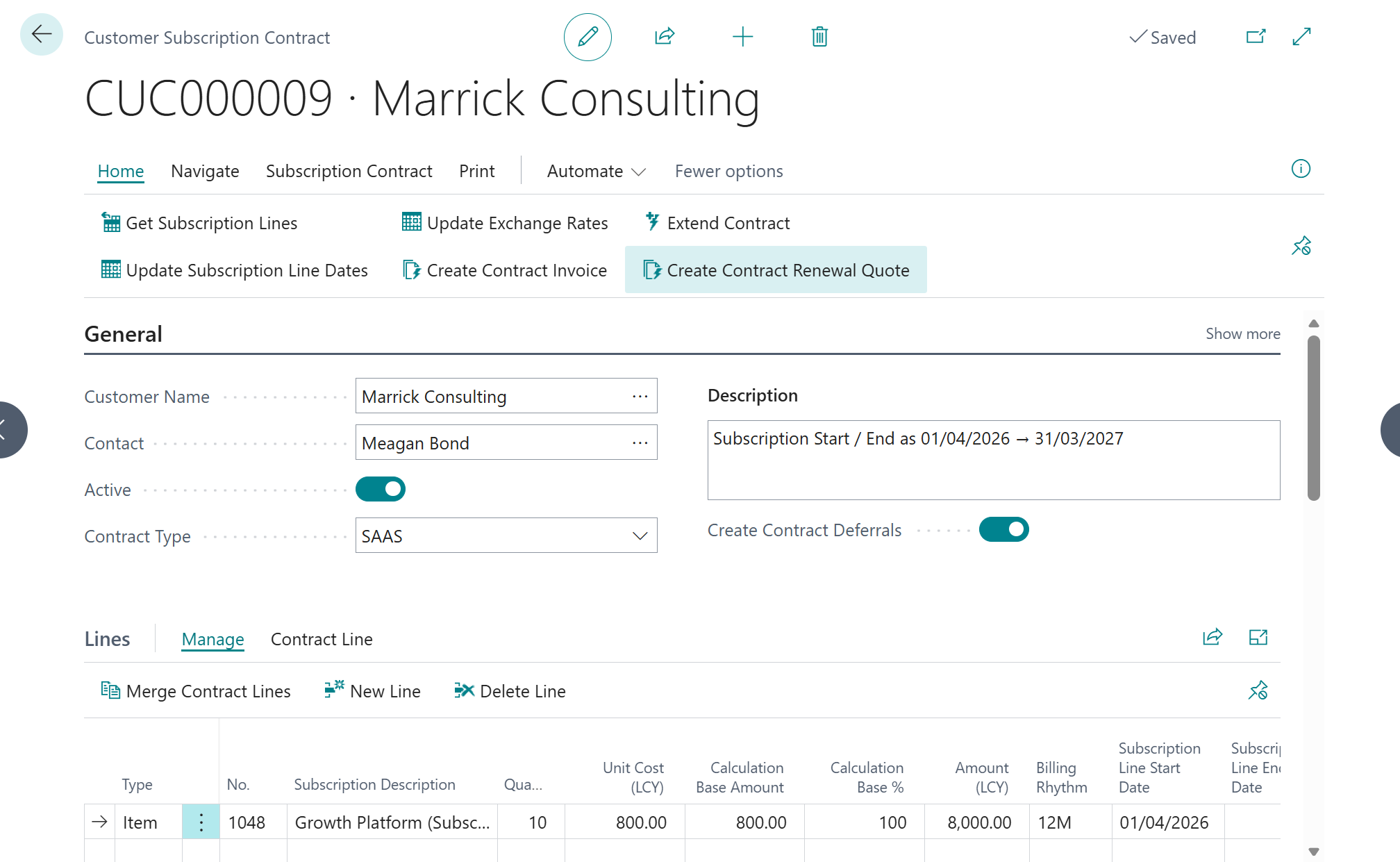
The screenshot is contract CUC000009 for Marrick Consulting, and three fields do the real work. Contract Type = SAAS classifies the agreement; Create Contract Deferrals is the master switch, turned on, it tells BC to defer every eligible line on this contract instead of posting it straight to revenue; and the header Subscription Start / End (01/04/2026 → 31/03/2027) sets the term the revenue is spread across.
On the line, the Growth Platform subscription item carries Quantity 10 (users) at £800 per user per month on a 12M rhythm, i.e. £96,000 for the year. Set the switch once on the contract and every invoice it raises inherits it.
Step 2 Run Billing Proposal
Open Subscription Billing › Recurring Billing › Create Billing Proposal.
Set Billing Date to the start of the cycle (01/04/2026) and Billing to Date to its end (31/03/2027), with Billing Template = CUSTOMER. Filtering to Contract No. CUC000009 keeps the run scoped to Marrick Consulting rather than sweeping every live subscription.
BC reads each subscription line and works out what is billable up to that date from three things on the line: the Subscription Start Date, the Billing Rhythm (12M : annually in advance), and the Next Billing Date. On a brand-new contract the Next Billing Date equals the start date, so the whole annual period 01/04/2026 → 31/03/2027 falls due in a single billing.
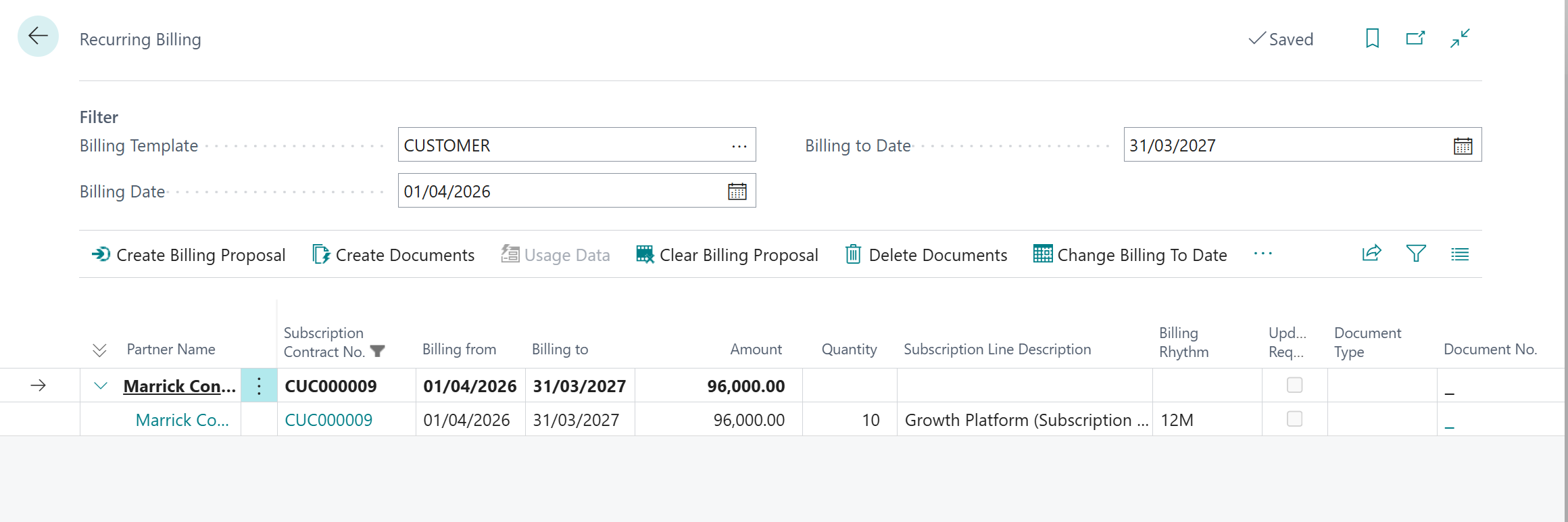
The proposal returns a single draft line: Marrick Consulting, £96,000, quantity 10, billing 01/04/2026 → 31/03/2027, on a 12M rhythm. Note the Document No. column is still blank. A billing proposal is a staging list you review and can correct before anything posts. At this point nothing has touched the general ledger.
Step 3 Create the contract invoice
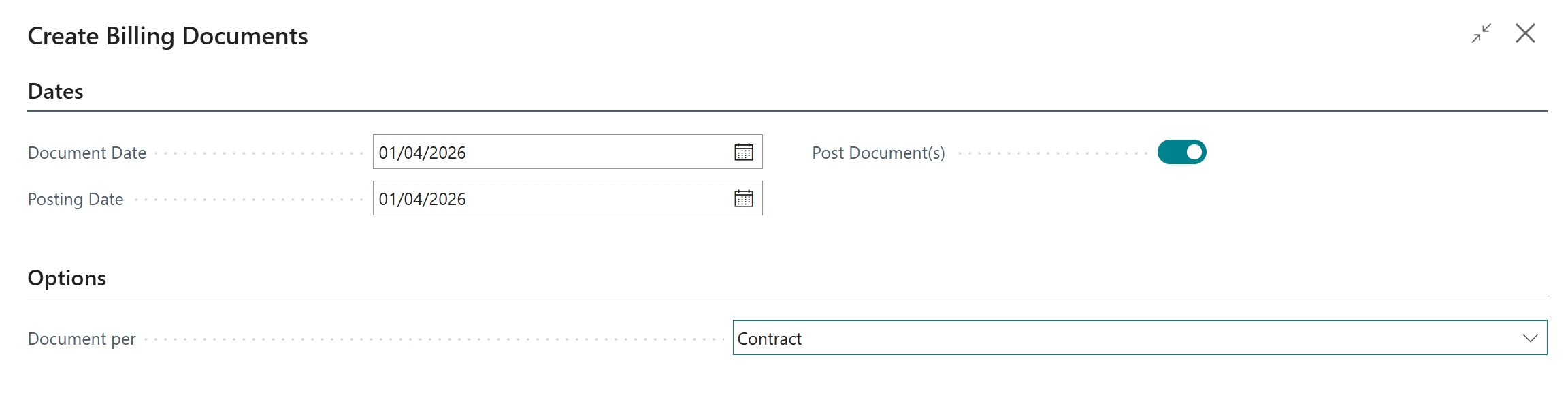
With the proposal reviewed, choose Create Documents. In the Create Billing Documents dialog, set both Document Date and Posting Date to 01/04/2026, leave Document per = Contract so every line for the contract lands on one invoice, and switch Post Document(s) on so BC creates and posts in a single step.
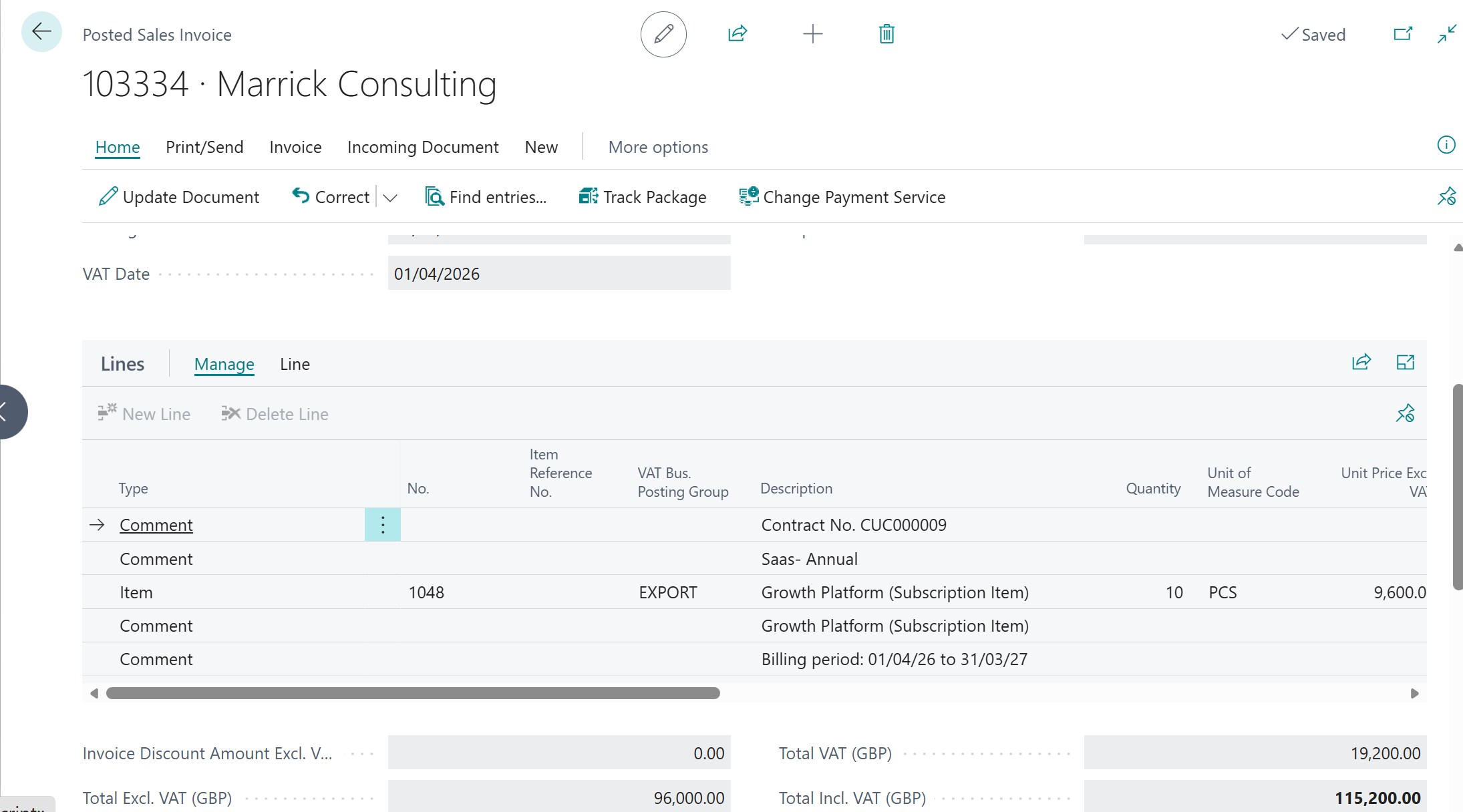
The result is posted sales invoice 103334. Two details matter. First, BC stamps the contract’s identity onto the document as comment lines: Contract No. CUC000009, Saas- Annual, and Billing period 01/04/26 to 31/03/27. So the invoice is always traceable back to the subscription. Second, the totals: £96,000 net, £19,200 VAT at 20%, £115,200 gross. Only the £96,000 fee is deferred; VAT is never deferred, which is why the ledger in the next step shows receivables at the gross £115,200 but the contract liability at just £96,000.
Step 4 Post the contract invoice
Posting does more than raise the invoice. From the posted invoice, Find entries lists everything the one document generated. G/L entries, the customer ledger entry, the VAT entry, and, the part that matters here, twelve Customer Subscription Contract Deferral entries: one slice for each month of the term.
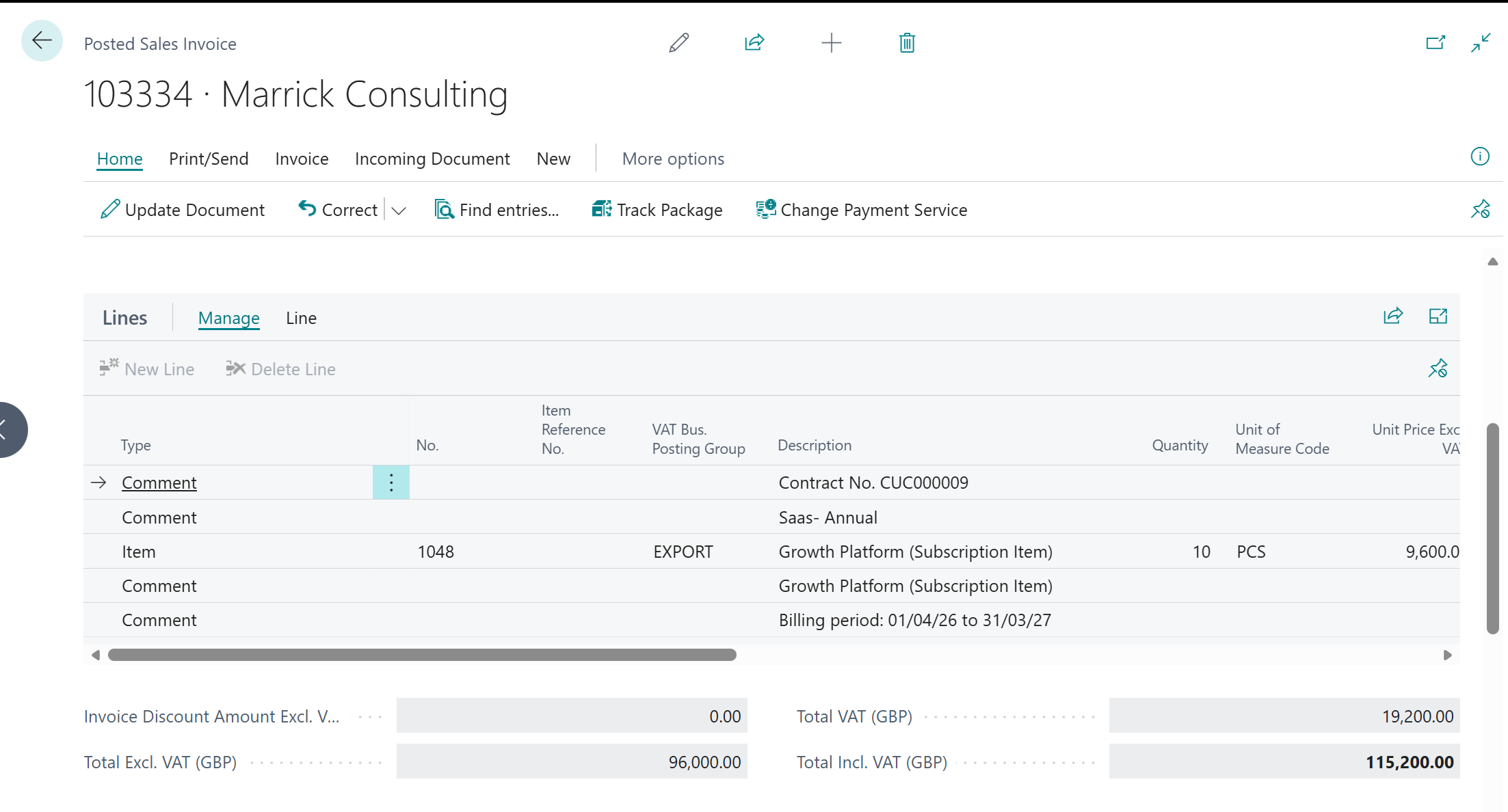
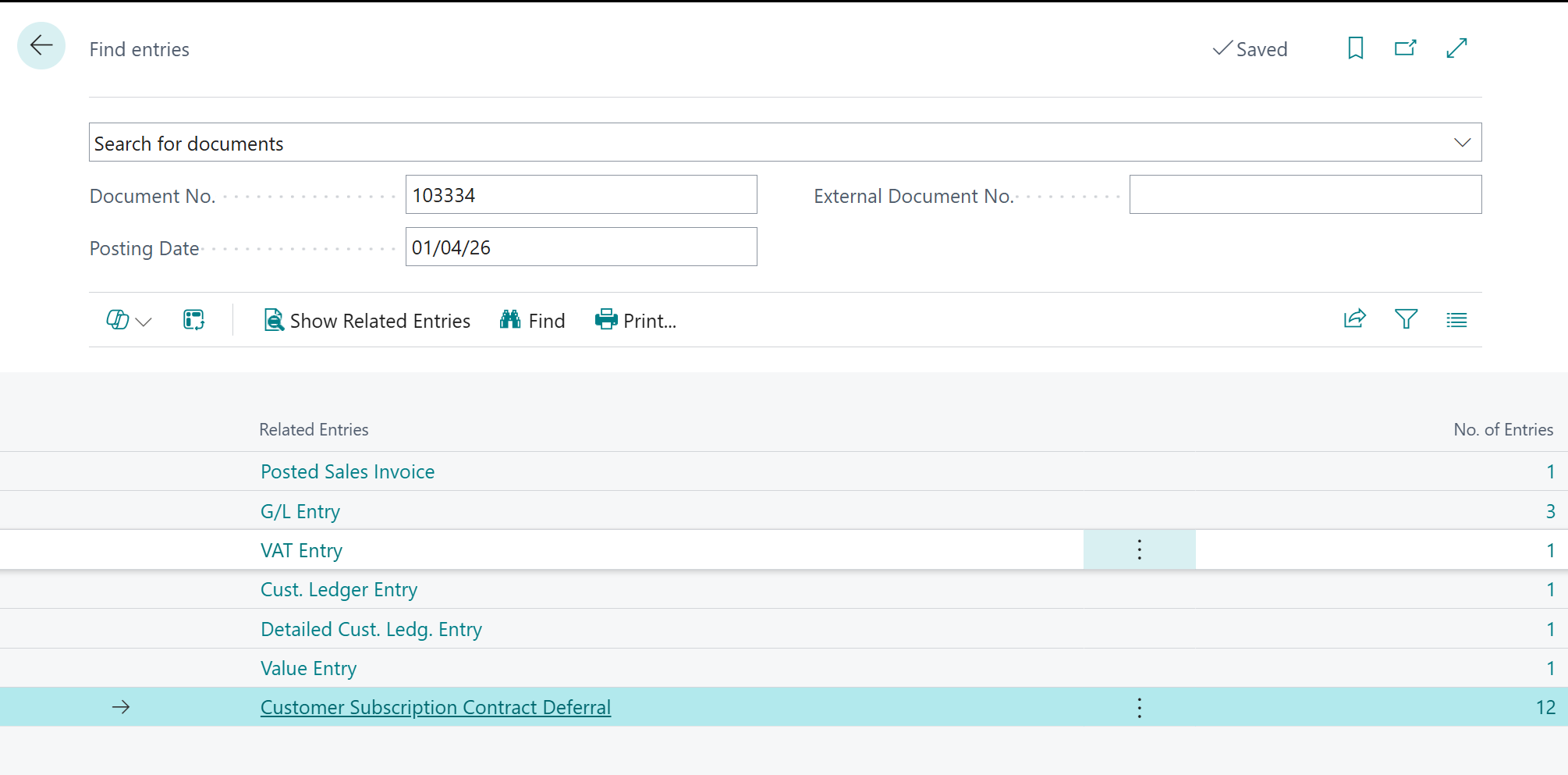
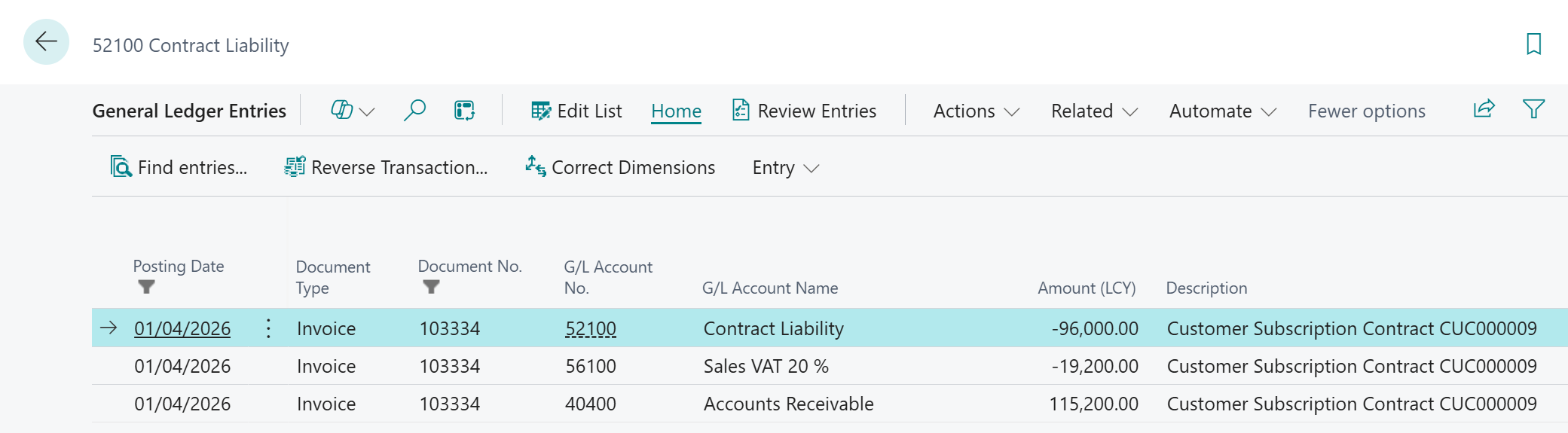
Drilling into the G/L confirms the double entry, every line tagged Customer Subscription Contract CUC000009. Accounts Receivable (40400) is debited £115,200, Sales VAT (56100) credited £19,200, and Contract Liability (52100) credited £96,000. Not a penny has reached a revenue account yet. £96,000 sits on the balance sheet as deferred income, exactly where IFRS 15 wants it until the service is delivered.
Step 5 Release the deferrals each month
Run Release Subscription Contract Deferrals with the posting date at month-end and a Post Until date of the same day. BC moves that month’s slice from contract liability into revenue, for every active contract at once, not just this one.
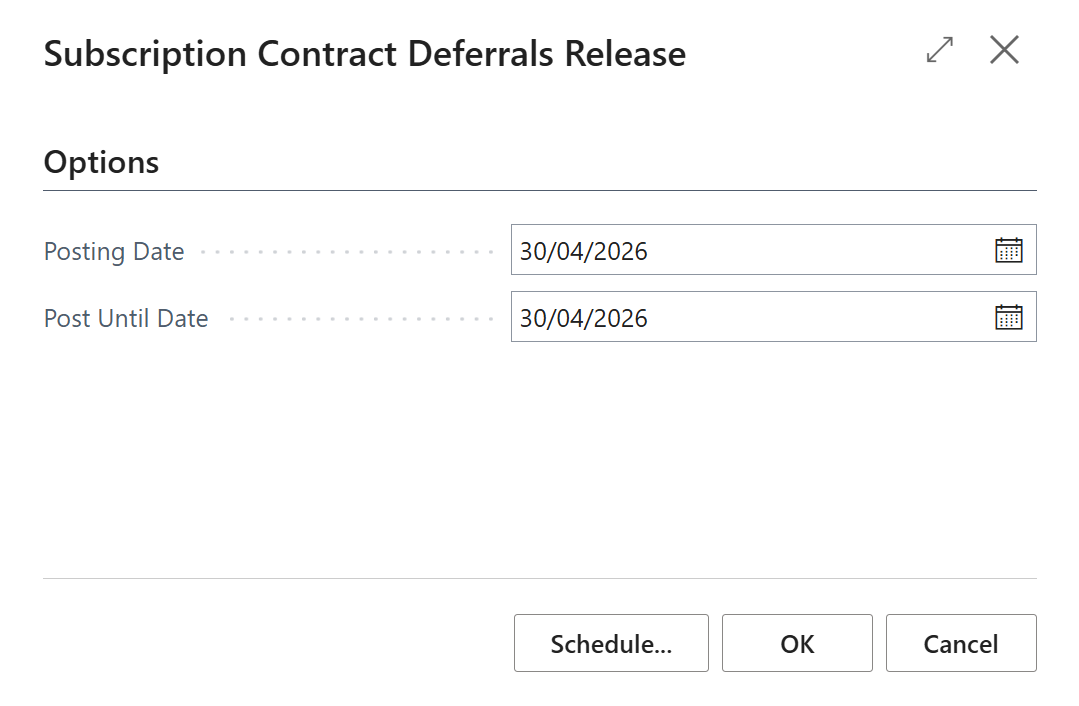
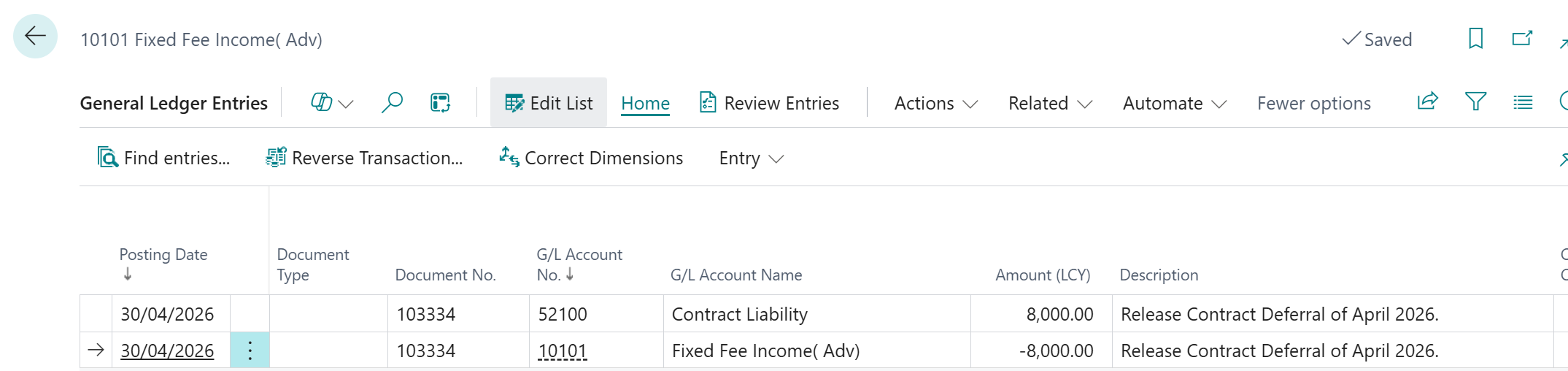
For CUC000009, the April release posts one clean entry: Contract Liability (52100) debited £8,000, Fixed Fee Income (10101) credited £8,000, described Release Contract Deferral of April 2026.
Because the term starts on the 1st and runs a full year, every month is a clean £96,000 ÷ 12 = £8,000; no pro-rating needed. (A mid-month start is exactly where the day-count in the opening question begins to bite; here it does not, because the subscription is whole-month aligned.) Repeat the routine each month-end and the £96,000 unwinds to revenue in twelve equal steps.
Automate it: Job Queue Schedule Release Subscription Contract Deferrals on BC's Job Queue for the last calendar day of each month, after the billing cut-off and before close. With 400+ contracts, manual release isn't viable. Each run posts one clean journal per period, auditable and reconciled straight back to the Deferrals page. |
Step 6 The Customer Subscription Contract Deferrals page
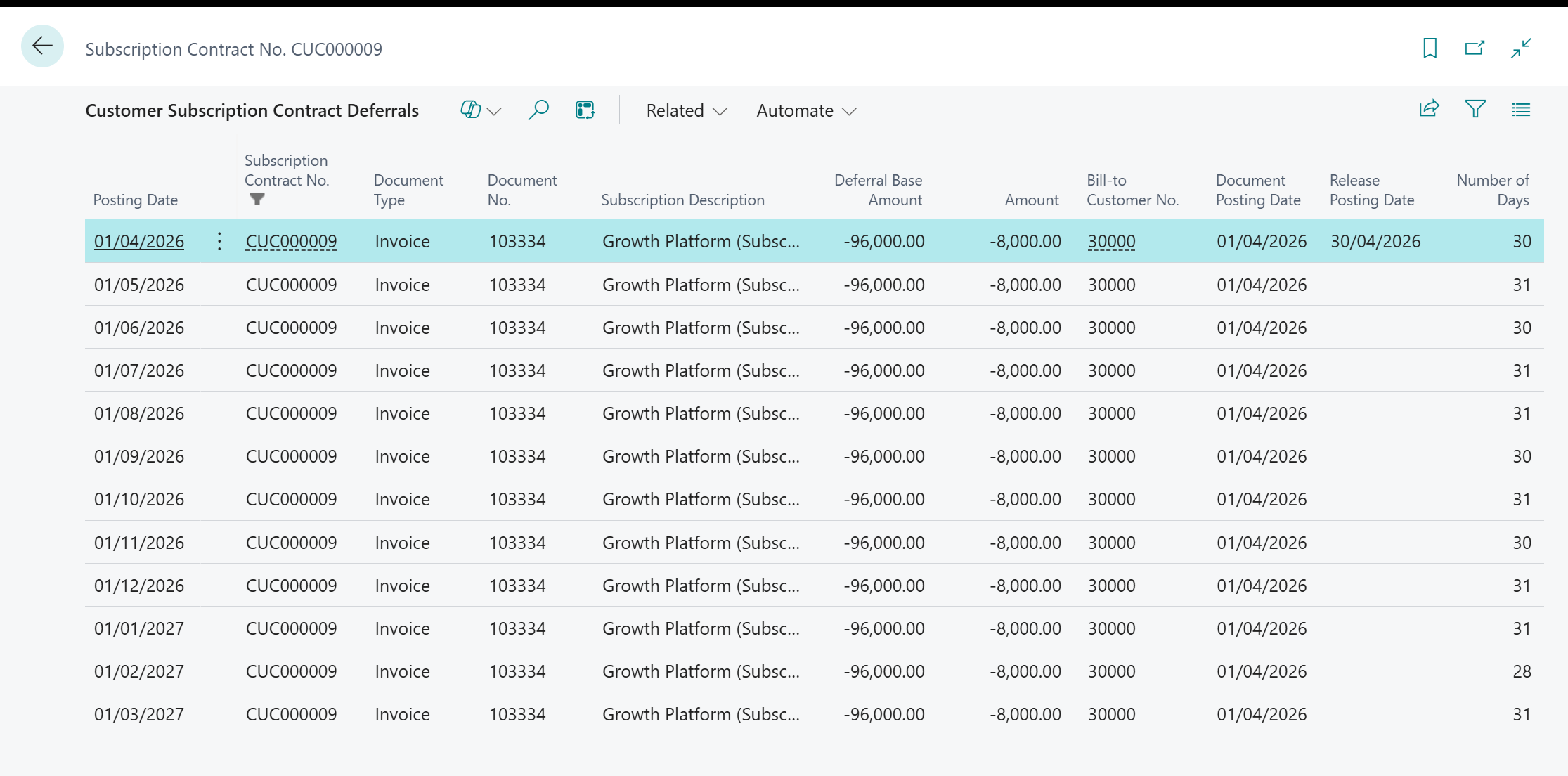 Opened from the contract, this page is your audit view: BC created one deferral entry per month at invoicing, and each release flips an entry from open to posted:
The list holds twelve rows for CUC000009, each showing a Deferral Base Amount of £96,000 and an Amount of £8,000. The first, dated 01/04/2026, already carries a Release Posting Date of 30/04/2026. (April slice just posted, while the other eleven stay open until their own month-end release). The page reconciles straight back to account 52100: sum the entries still open and you have the contract liability left to earn.
UP NEXT · POST 4 Projects, Percentage of Completion & WIP Revenue Recognition Crestline Engineering Ltd wins a £4.2m EPC contract. We build the WIP posting groups, configure the Project (Jobs) module for over-time revenue using the input method, handle a mid-project contract modification, and show how BC recognises revenue, tracks contract assets, and produces the WIP reconciliation at each month-end. |
📝 This post reflects the author’s professional views and is for informational purposes only. It does not constitute legal, financial, or accounting advice. |